Workstation
On your machine, in a real worktree
Use the repository, toolchain and explicitly allowed caches already on your workstation. The source stays there unless you choose an upload workflow.
Hive runs your CI. When an eligible check goes red — one your pipeline opted in, whose failure looks like code work — a scoped coding agent gets the run’s evidence, pushes a candidate to your branch, and a fresh CI run decides whether it worked.
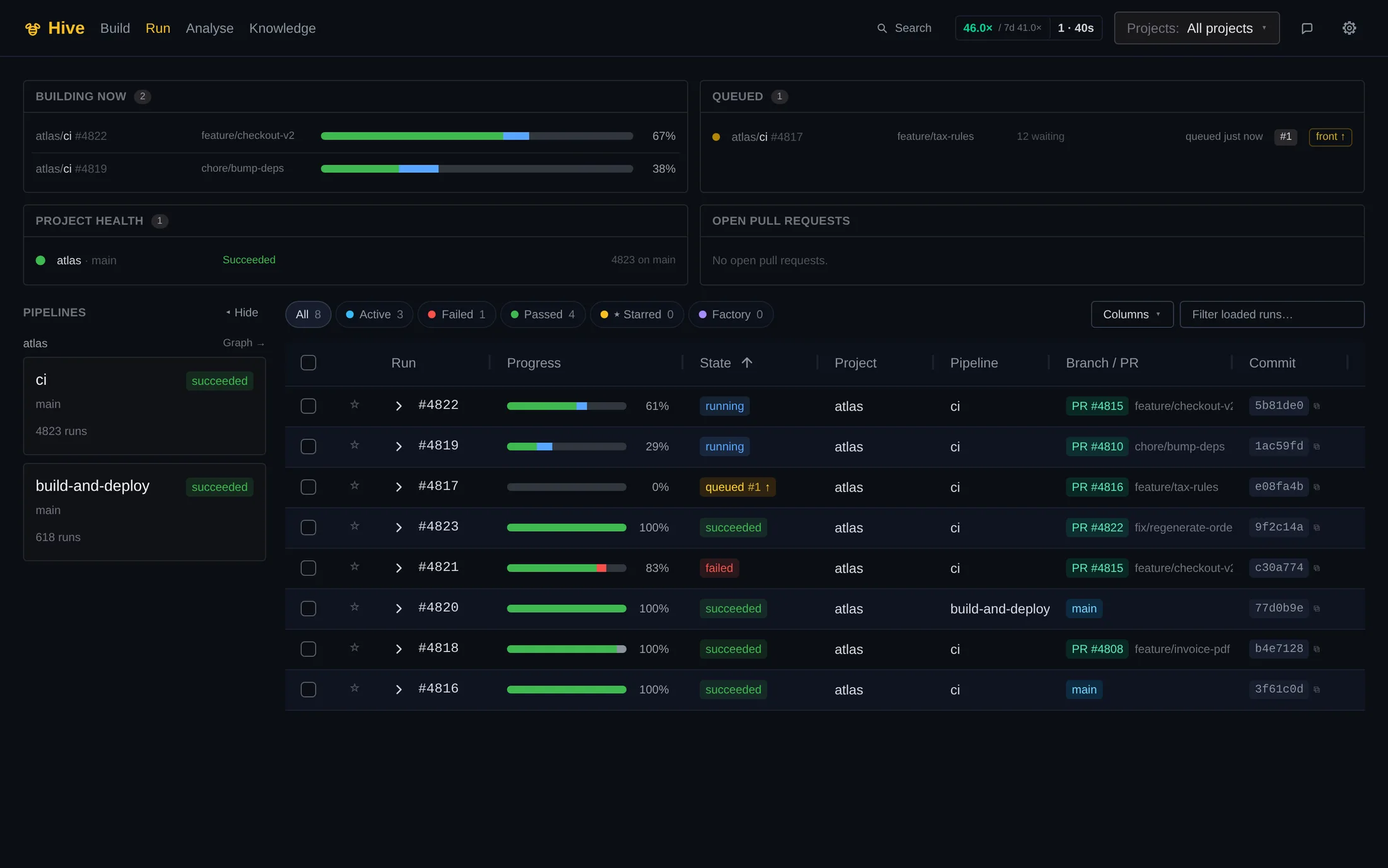
Hive’s own dashboard — a red build, the agent’s fix, and the green run after it.
Hive builds Hive — every commit to this product ships through its own pipeline, agents included.
Starlark
pipelines as code
Your key
your model provider
EU
control plane in Germany
How it works
Hive classifies what failed. A check wakes an agent only when the pipeline opted in, policy allows it and the failure looks like code work.
The coding task starts with the run, bounded logs, branch diff and named failing tests already attached.
The agent edits inside an isolated workspace. A wrapper outside the model enforces scope, budget and the lane’s configured verifier.
The candidate is pushed to your branch and a fresh CI run verifies it. Required checks and your normal review policy stay in control.
fixer = fix_step(target = "test") # @hive//factory.star (agent, dormant)hive.pipeline(name = "pr-checks", on = [hive.on.pull_request(branches=["main"])], steps = [ hive.step(name = "test", image = CI, run = "go test ./...", on_failure = fixer), fixer, ])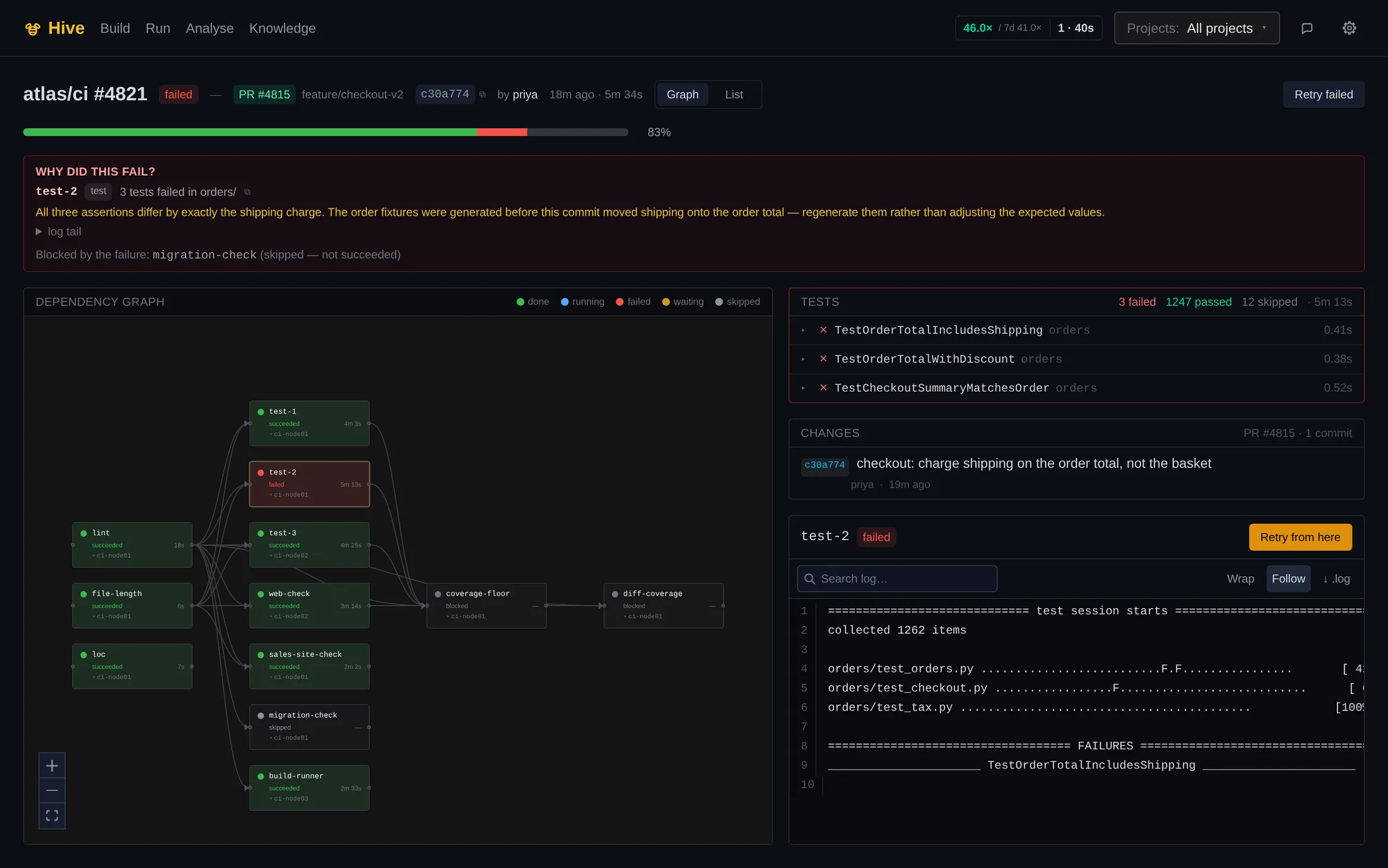
02run #4821, and why it failed
Captured from the committed fixture set, not from production
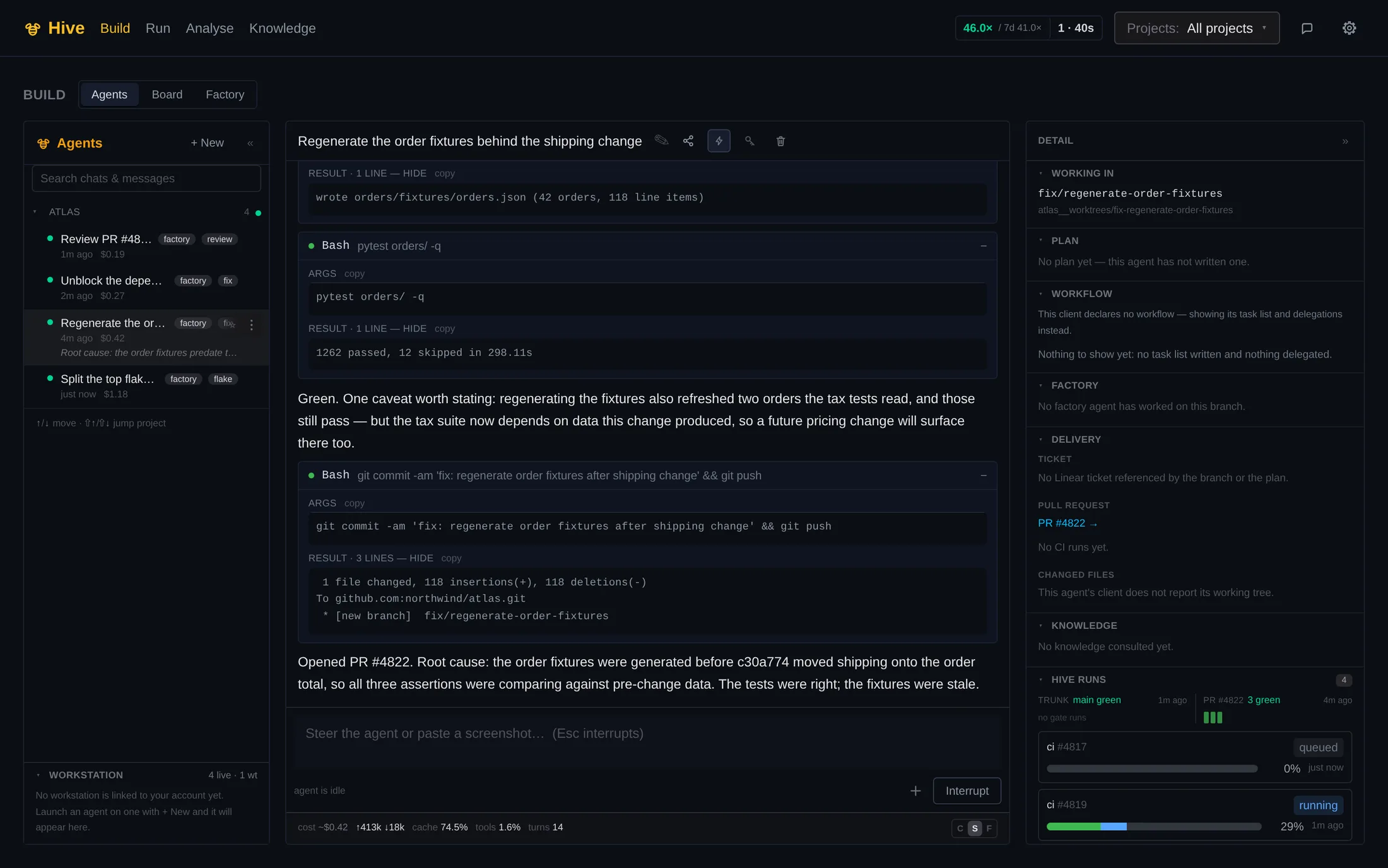
03the agent that fixed it
Captured from the committed fixture set, not from production
Is Hive for you?
Agent platform
Direct agents at the work you chose, or let CI wake one for an eligible failure. Watch every attached session beside its branch and checks—and steer it mid-turn from the browser.
Use the repository, toolchain and explicitly allowed caches already on your workstation. The source stays there unless you choose an upload workflow.
Move an interactive session to an ephemeral, resource-capped pod when you want the laptop back or need more parallel capacity.
A failed check can wake a policy-wrapped agent with the run evidence attached. The wrapper owns budgets, verification and delivery.
$ hive launch --repo acme/shop --branch fix/checkout-total \ --target workstation --prompt "Make order totals include shipping"session started on this workstation · worktree ready · attached (tmux -L hive-agent)One workspace, separate trust boundaries. Workstation, cloud and Factory agents share session and delivery visibility without pretending they hold the same authority.
Explore the connected agent platformhive-pi harness
Project context, tools, plans, tasks, delegated research, quality gates and Hive telemetry turn a raw coding model into an operable session.
Explore the hive-pi harness✓ done Read the failing test and the fixture generator✓ done Regenerate order fixtures with shipping lines▸ in progress Re-run pytest orders/ -q· pending Commit and push to feature/checkout-v2· pending Report the root cause on the pull requestRules, branch facts and relevant knowledge arrive before the first edit.
Typed local and MCP capabilities replace copy-pasted dashboards.
Plan, workflow, tasks, usage and CI stay beside the transcript.
Steering, delivery and verification connect to the same control plane.
CI/CD platform
Real pipeline code, hybrid runners, warm inputs and one API make Hive a build system first—and give its agents evidence they can act on.
Starlark gives you functions, loops and reuse across repositories while evaluation stays deterministic and versioned beside the code.
load("@hive//checks.star", "checks") # grouped: ruff && mypy in one backend-lint podchecks.lint(name = "lint-backend", stack = "backend", tools = ["ruff", "mypy"], paths = "shared", image = CI_IMAGE, when = be_touched) # fanned out: one test node per module (module fanout via a comprehension)[checks.test(name = "test-" + m, stack = "backend", component = m, cmd = "scripts/run_tests.sh " + m, image = CI_IMAGE, when = ctx.changed(m + "/**"), autofix = True) for m in ["shared", "trader", "worker"]]Connect machines you already own, rent burst capacity when it helps, and let constraints place each task on the right lane.
Fingerprint-keyed images, registry caches and template test databases cut repeated setup before the command starts.
Runs, logs, tests and fleet state are first-class calls for the CLI, your scripts and your own agents—not pages to scrape.
explain_failure { "run_id": "#4821" }→ state: failed test-2 · failed · error: exit status 1 log tail: FAILED orders/tests/test_total.py::test_order_total_includes_shipping autofix_note: the run’s own fixer is already acting — wait for its commitWhy Hive
| Capability | Hivethis product | Jenkins | TeamCity | GitHub Actions |
|---|---|---|---|---|
| Acts on eligible code failures | yes: Scoped agent → verified candidate | no: No | no: No | no: No |
| Pipeline config | yes: Starlark (typed, reusable) | partial: Groovy DSL | partial: Kotlin DSL / UI | partial: YAML |
| Cost on your own hardware | yes: Free — no seat or agent fee | partial: Free + your ops time | no: Per-agent annual licence | partial: Self-hosted runners, still per-seat |
| Maintenance burden | yes: Nothing to operate — we run it | no: Plugin ecosystem = your problem | partial: Moderate | partial: Managed (cloud only) |
| Build caching | yes: Warm images + template DBs | partial: DIY | partial: Partial | partial: Cache action (slow at scale) |
Pricing
Two things cost us money to provide — rented compute and storage on our hardware — and those are the two things with a meter. Everything you bring is free.
Free
your hardware, our control plane
Connect the machines you already have. No compute bill.
CPU-minutes
50,000 free every month during the private beta
Packs are sold in CPU-minutes, not in euros. What a new pack costs moves with the hardware market. What you already hold does not — a CPU-minute you bought last year still buys a CPU-minute. For scale: the free beta allowance alone is 12× GitHub Actions’ free tier, and we meter by the millisecond where they round every job up to a whole minute.
Rent capacity when your own runs out — or skip hardware entirely.
Talk to us
Design partners · planned for general availability
Help shape the team controls and dedicated capacity you need.
You are billed for compute and storage you actually use on our hardware — never per seat, never per build. Final rates are announced at launch; waitlist members get early-bird terms and a say in them.
FAQ
When an eligible check fails, Hive attaches the run, logs, diff and failing tests to a scoped AI-agent task. The agent writes a candidate; the wrapper applies its configured verifier and pushes the result to your branch. A fresh CI run on that branch decides whether the candidate worked, and your normal review and merge policy stays in charge.
Model requests go only to the provider you configure, using your own credentials. On runners you connect, the checkout stays on that hardware. A local check snapshot or hosted workflow can temporarily store source, logs or artifacts under the published retention policy; Hive does not use your source to train a model.
Hive is operated by Pulsar-Projekte GmbH, a German company registered in Bavaria. The control plane runs on a server in Germany; this marketing site is delivered as static files by Cloudflare. There is no analytics, no tracking and no cookie banner here — the Datenschutzerklärung sets out exactly what is processed and on what legal basis.
You bring your own model API key, so token costs go straight to your provider at their rates — no markup. Hive shows per-fix token spend and lets you set hard daily caps, so there are no surprise bills.
No — but you can use it, and it is free if you do. We host the control plane and the UI; you choose where the work runs. Connect your own machines as runners with a one-line install (Linux, macOS, Windows), rent capacity from us as booster packs, or mix the two and let the queue spill over onto ours when yours is full.
Yes. An agent launched onto your workstation gets a real git worktree there and uses that machine’s checkout, toolchain and explicitly allowed caches. Source stays on the workstation for that lane. A cloud session instead uses an ephemeral checkout on rented capacity; both appear in the same browser workspace, with controls that match each lane’s trust boundary.
Compute you rent from us by the minute instead of buying. When a run uses hosted capacity, Hive records the settled CPU-milliseconds against the tenant and project so you can see what each run spent and what balance remains. Private-beta tenants get 50,000 CPU-minutes a month. Packs are denominated in compute rather than money, so a repricing changes what a new pack costs and never what you already hold. Balance-based admission enforcement is still rolling out during the beta.
No. A repo opts in by committing one file, and Hive starts in shadow mode — it posts its own status and requires nothing, so your existing pipeline keeps gating merges exactly as before. You compare the two on real commits for as long as you like. Making Hive a required check is a separate decision you make in your repo settings, and our own onboarding runbook tells you not to retire the old CI until a preflight check reports clean. Start with one repo, one job — a useful pipeline is a few lines — and widen it when it has earned that.
No — it runs them. Hive’s agents authenticate as you, with the subscription or key you already pay for: an Anthropic Claude or OpenAI Codex subscription, a Cursor account, or an OpenRouter key routing to whatever model you like. Your local setup is untouched, because CI runs server-side and needs nothing installed on your machine. And Hive exposes over a hundred MCP tools, so you can drive runs, read logs and diagnose failures from the editor and agent you already use instead of switching to our UI.
No. Hive reads code, posts statuses and receives webhooks through a GitHub App, so today it runs GitHub repositories only. There is no GitLab or Bitbucket integration, and we are not announcing one here.
A failed lint, test or build step whose pipeline opted in with on_failure. Infrastructure failures and timeouts never wake a fixer, a fixer’s own commit never wakes another one, and a fixer that fails or cannot verify its work leaves the original failure standing. The candidate must pass a fresh CI run and it never merges by itself — your review and merge policy remains authoritative.
A Starlark file at .hive/main.star. A useful one is a few lines: load the standard pipeline builder, name a lint step and a test step, and optionally attach a fixer to the test step. The docs page “Your first pipeline” shows the shape and how to watch the first run.
hive check --step <name> uploads a snapshot of your working tree, runs that step and its dependencies on the fleet, and prints the failing task’s log tail. It needs a reachable server, a token and a registered project; it is not a local runner.
Runs 90 days, events 14 days, artifacts 7 days, caches 30 days; a hive check snapshot is deleted after 7 days. Deletion from object storage is carried out transactionally rather than by a best-effort sweep.
Actions runs your workflow and hands you a red X. Hive runs your pipeline and hands you a fix. Beyond the factory, you get pipelines as real code (Starlark, not YAML), warm caches by default, and the choice of whose hardware the work runs on — yours at no compute cost, ours by the minute, or both.
Hive is in private beta now. Waitlist members are invited in order and get early-bird terms; every beta tenant gets 50,000 CPU-minutes a month to run jobs on our hardware while they try it — about 12× GitHub Actions’ free tier.
Join the private beta. Connect your own machines and pay nothing for compute, or run on ours — every beta tenant gets 50,000 CPU-minutes a month.